Your order is booked, the seller has sent you a long string of digits, and now you want to know where the parcel is. That string is your courier tracking number, also called the AWB number. Enter it on the courier’s tracking page or the seller’s tracking page and you will see the latest scan, the location and the expected delivery date.
This guide shows you how to do that in under a minute, what each status means and what to do when tracking goes quiet. Stay till the end for a simple checklist you can screenshot. If you sell online, there is a section for you too.
What Is an AWB Number and Is It the Same as a Courier Tracking Number
An AWB (Air Waybill) number is a unique number assigned to a shipment by the courier company. You can use it to check where your parcel is and track its delivery status. Although the term comes from air freight, courier companies in India also use AWB numbers for road and surface shipments.
A courier tracking number serves the same purpose. Depending on the courier company, you may also see it called a tracking ID, consignment number or waybill number. The format and length can vary from one courier to another, so don’t worry if your number looks different from someone else’s.
One important thing to remember is that your order ID and AWB number are different. Your order ID is generated by the online store when you place an order, while the AWB number is assigned by the courier for shipping. To track your parcel on the courier’s website, you’ll usually need the AWB or tracking number rather than the order ID.
Where can I find my courier tracking number
Check these places in order:
- The dispatch SMS or email from the seller
- The order details page in your account or the store app
- The WhatsApp update, if the brand sends them
- The shipping label on the parcel itself
- The seller’s support team, who can read it from their shipping dashboard
How do I do AWB number tracking step by step
When you type “track my order” into a search bar, this is the flow that works every time.
- Copy the AWB from your SMS, email or order page. Paste it instead of typing it, because one wrong digit returns “not found.”
- Note the courier name. The dispatch message normally mentions it.
- Open the courier’s tracking page or the seller’s own tracking page. Always use the courier’s official page, never a random lookalike site. A branded seller page does the courier lookup for you.
- Paste the number and press Track. Many courier sites accept several numbers separated by commas.
- Read the full scan history, not just the top line. The last scan location tells you more than the headline status.
- Check again after the next scan, or switch on notifications if the page offers them.
Next up is the part most guides skip. Knowing what a status means is what decides whether your parcel arrives or comes back.
What do shipment tracking statuses actually mean
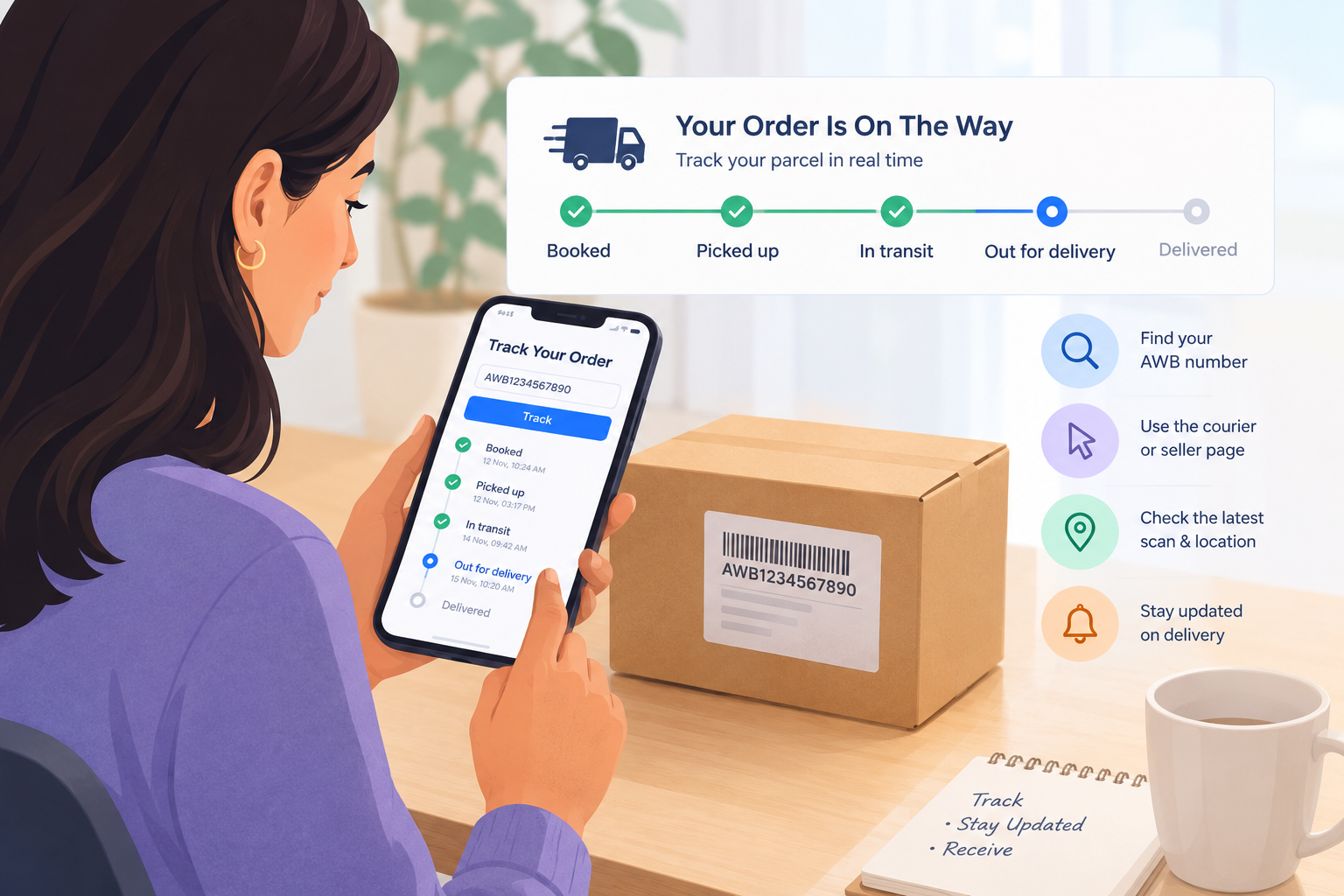
Courier labels differ, but most Indian shipment tracking pages follow this pattern:
- Booked or manifested: The AWB exists. The courier has not collected the parcel yet.
- Picked up: The parcel has left the seller’s premises.
- In transit: It is moving between hubs. On long routes, a day or two between scans is normal.
- Out for delivery: The parcel is with the delivery agent, usually for same day delivery.
- Delivery attempted or NDR: NDR means non delivery report. The attempt failed because the customer was unreachable, the address was incomplete or the premises were closed.
- RTO initiated: The parcel is returning to the seller.
- Delivered: The courier has marked it complete.
The two statuses worth acting on fast are NDR and RTO. Speed matters here, because a failed attempt that nobody follows up on often turns into an RTO. A quick reply to the courier’s call or WhatsApp at the NDR stage often saves the delivery. Sellers can automate those follow ups with NDR follow ups on Shipway.
What should I do if my online order tracking shows no update
- AWB not found: Give it a few hours to a day. A fresh number can take time to go live in the courier system.
- No scan for three days: Ask the seller to raise a ticket with the courier. The courier’s ops team searches by AWB, so quote it every time.
- Marked delivered but not received: Check with neighbors and the security desk, then ask the seller for proof of delivery and the agent’s details the same day.
- Lost the number: Ask the seller, or try your mobile number or order ID on the seller’s tracking page.
- Stuck at NDR: Reply to the courier, share a landmark and a working phone number, and ask for a reattempt.
How can sellers make online order tracking easier for customers
Customers do not hunt for a courier tracking number because they enjoy it. They do it because nobody told them anything. Gorgias notes that “where is my order” queries, known as WISMO, can account for 30 to 50 percent of all support tickets for some ecommerce brands.
On the ops floor, the pattern is familiar. A customer opens a courier site, sees “shipment held at hub” and calls support because the status means nothing to them. A branded tracking page fixes this. Shipway lets brands run a tracking page with their own logo, send WhatsApp, SMS and email updates at every shipment milestone and let customers request a delivery reattempt from the same page.
Try the three touchpoint rule. Message the buyer at dispatch, at out for delivery and at any exception such as NDR. Three messages remove most “where is my order” calls before they start.
A practical checklist for sellers:
- Send the courier tracking number within minutes of dispatch, on WhatsApp and SMS both.
- Translate courier jargon into plain language on your “track my order” page.
- Give split orders SKU level visibility. If one order ships as two parcels, each AWB should show its own items so the buyer does not think half the order vanished.
- For B2B replenishment to GT and MT outlets, share the AWB or LR number with the receiving team early. Stock that lands late breaks Perfect Store execution on the shelf.
- Watch your NDR rate along with your delivery rate. Rising NDRs are an early warning for RTO. Our guide to reduce RTOs covers the fixes.
- Ship with several couriers? Read how multi courier shipment tracking keeps every AWB in one view.
Quick test for your own store. Pull last month’s support tickets and tag every “where is my order” message. If it is more than one in five, your tracking experience needs work.
Conclusion
Tracking a parcel is simple once you have the AWB. Here is the 60 second checklist to screenshot:
- Find the AWB, not the order ID.
- Paste it on the courier or seller tracking page.
- Read the last scan, not just the headline.
- Reply fast if the status shows NDR.
- No scan for three days? Ask the seller to raise a courier ticket.
Sellers have the bigger job. Do not make customers hunt for answers. Put the status in front of them before they ask. If you want to give your buyers a branded tracking page with automated updates, see how Shipway’s post purchase tracking works and book a demo. Want more reading first? Browse our order tracking articles.
What is an AWB number in courier tracking?
It is the unique ID a courier gives each shipment at booking. It identifies the parcel in the courier’s network and lets you follow it from pickup to delivery.
Is a courier tracking number the same as an AWB number?
In most cases, yes. Couriers also call it a tracking ID, consignment number or waybill number. They all point to one shipment.
How long does a tracking number take to start working?
Usually a few hours, sometimes up to a day after booking. If it still shows nothing after that, ask the seller to confirm that the courier has received the shipment.
Can I track my order without an AWB number?
Often yes. Many sellers let you search with your order ID or registered mobile number on their tracking page. Courier websites generally need the AWB.
Why does shipment tracking say delivered when I have not received the parcel?
It can be a wrong scan, a handover to a neighbour or security desk, or a premature status update. Contact the seller the same day and ask for proof of delivery.